
- First, you must go on the professors website which is https://wgs1001sp21.commons.gc.cuny.edu
- After reaching the website, go to our class time, which is found on the left hand side and click on Tuesday’s 5:05 pm
- Next, locate the “New+” button on the top. It is very small and has a “+” next to it.
- You will see 3 options; either “post, media, or document” and click on post
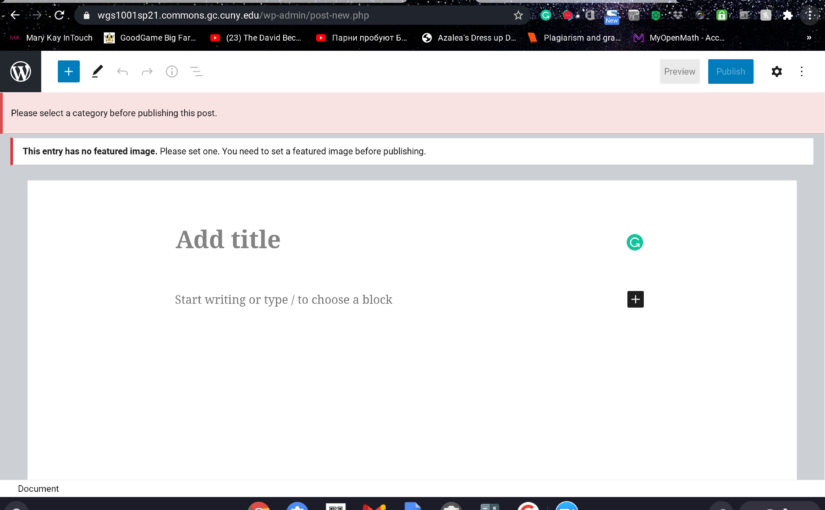
- You must add a featured image or it will not let you post. You also must add a category on the right side under “category”
- After clicking on post, you will reach this screen with an empty white space where you can now post weekly blogs :))) !!
Posts

Write a Post! How to write a post: 1. On our commons website click on our class time (Tuesdays) 2. click on the assignments tab 3. Read the assignment instructions 4.Complete the assignment 5. get notifications for replies etc 6. Click “post comment”

How to Write a Blog Post:
- On the commons website click on your class time
- Click on the assignments or posts you wish to answer
- Read the directions
- In the comment section answer what is being asked, post your pictures, etc.
- You can choose to click “notify me of follow up comments via email.”
- Click “post comment.”

How to write a post:
How to write a post:
1. On the commons website click on your class time
2. click on the assignments or posts you wish to answer
3. Read the directions
4. In the comment section answer what is being asked, post your pictures, etc
5. You can choose to click “notify me of follow up comments via email”
6. Click “post comment”

How to write a post:
1. On the commons website next to where it says “intro to women, gender, and sexuality studies” Hover over “+ New” and click below where it says “Post”
2. Write your response
3. You can add a featured image using the white menu bar on the right hand side where it says “featured image“
4. Also in the white menu bar is the “Categories” section where you can check off “Blog post 1 ” and “Tues/Thur Section“
5. Once you are finished doing all of that click “Publish“
Post 2: What is gender?
What is gender? Where do we see it? How does society manage it (or tell us what it is, or should be)? Give a couple of examples of how society reinforces gender roles.
How does gender relate to power and privilege? Do some genders have fewer obstacles versus others? Why do you think this is? Who benefits? Who decides which gender is legitimate? How?
In our society, the number of genders has traditionally been two–male and female, which is restrictive and coercive to those who don’t identify that way. How many genders might there be?

How to create a Post
Instructions on how to write a post:
1. Log into Common
2. On the left side of the screen there should be a Table of Content that says your day/time of your class. Click on your assigned class
3. Click on your “Assignments’
4. After reading the instructions of the assignments, on the top right there is a “+”
5. Click on “Post”
6. Write your thoughts/comments/etc. After you’re done writing, on the right panel of your screen under document > featured image > find a picture to post
7. When you’re done, click on “Publish” , you did it! You created a post

How to Write a Post
By Ann Marie Broome
Students are required to post and respond to posts throughout the semester. Each student must create a user profile in order to access the class website. After creating the profile, students can use the following steps to post to the WGS1001 website.
- Log on to the class website at https://wgs1001sp21.commons.gc.cuny.edu/ using your log in credentials.
- Select your assigned class from the menu on the left side.
- Once you are in the correct class, click on the +New icon on the top black menu bar.
- Select Post from the three menu options. The first time you log in, pop-ups will appear to give you hints and features about posting.
- Start typing to choose a Block or to select design options.
- To add a photo, click on the blue + at the top left and scroll down to Image or Gallery. Select your saved photo and click on Upload. You can write a caption for the photo by clicking directly on the photo.
- Continue writing the post using the editing features available to format your entry.
- Proof read the text, checking for grammatical errors and ensuring the format looks good. You can also preview your post by clicking the Preview button in the top right.
- Before the final step, you will have to add a featured image to the post, this will appear a the top. Go to Document in the right panel and scroll down to Featured Image. Upload your saved image.
- When you are satisfied with the post, click on the Publish icon in the top right.
How to write a post:
- Log onto the Commons website using your username and password.
- Select your course, for example, “Intro to Women, Gender and Sexuality Studies class: Tuesday and Thursday, 9;30”
- Click on the assignments.
- Above the menu, you will be able to see “+New”, click on it and then on “Post”.
- You will see a new document template and you can start writing your post.


How to Post
- Making a post is a simple process as long as you follow these steps
- First, go to the page of your class, https://wgs1001sp21.commons.gc.cuny.edu/, and log into your account. Or if you do not have an account, click Register to create one
- Click the specific class that applies to you, for example, it can be Tuesday/Thursday 9:30 am
- On the top black bar, you will select the +New option, then click Post
- If you would like to add a picture you can click the blue + on the top left of your screen and select a photo you would like
- To finish, click Publish at the top and now you have made your first post!

